The Case Lifecycle represents the complete journey of an investigation in OWL, from the moment a case is created until it is closed, archived, and eventually deleted according to organizational retention policies.
A case acts as the central workspace where investigators collect evidence, manage subjects, collaborate with team members, document investigative activities, and maintain a complete audit trail. Throughout its lifecycle, the case evolves as new information is added, investigative actions are performed, and the investigation progresses toward completion.
The lifecycle helps investigators follow a structured investigative process while ensuring data integrity, compliance, collaboration, and accountability.
Case Lifecycle Flow
The lifecycle of a case typically progresses through the following stages:
- Case Creation
- Active Investigation
- Case Status Progression
- Investigation Completion
- Case Closure
- Archive and Retention
- Case Deletion
Organizations may configure additional statuses or workflow stages to align with their internal processes.
Case Lifecycle Stages
1. Case Creation
The lifecycle begins when an investigator creates a new case in the Case Management module.
During case creation, users provide the primary information required to initiate the investigation, including case details, ownership, governance settings, access permissions, attachments, and intake notes.
Typical information captured includes:
- Case Number
- Case Name
- Case Owner
- Department
- Case Status
- Classification
- Governance and Retention settings
- Access Rights
- Legal Hold
- Supporting Attachments
- Intake Notes
Once the case is saved, it becomes available in the Case Dossier, which serves as the central workspace for managing the investigation.
 2. Active Investigation
After a case has been created, investigators begin the investigation from the Case Dossier.
The Case Dossier provides a centralized location where investigators can organize evidence, manage investigative activities, collaborate with other users, and monitor the progress of the investigation.
During this phase, investigators continuously update the case as new information becomes available.
The following activities are commonly performed during an active investigation.
Case Template
Investigators can apply a Case Template from the Template Library to standardize the structure of the investigation. Templates help populate predefined sections, ensuring consistency across investigations and reducing manual configuration.
Subjects
Investigators can add and manage subjects associated with the case.
Subjects may include:
- Suspects
- Victims
- Witnesses
- Persons of Interest
- Organizations
- Vehicles
Locations
Subject information can be updated throughout the investigation as additional intelligence becomes available.
Associated Cases
Related Cases can be associated when they involve common individuals, organizations, vehicles, locations, or criminal activities.
Associated Cases help investigators:
- Identify connected investigations
- Share intelligence
- Reduce duplicate investigations
- Discover larger criminal patterns
Tasks
Investigators can create and assign investigative tasks to field officers, analysts, or other team members.
Tasks may include:
- Evidence collection
- Witness interviews
- Surveillance activities
- Background verification
- Site inspections
- Digital forensic analysis
Completed tasks contribute to the overall investigation and help ensure all required activities have been performed before the case is closed.
Documents
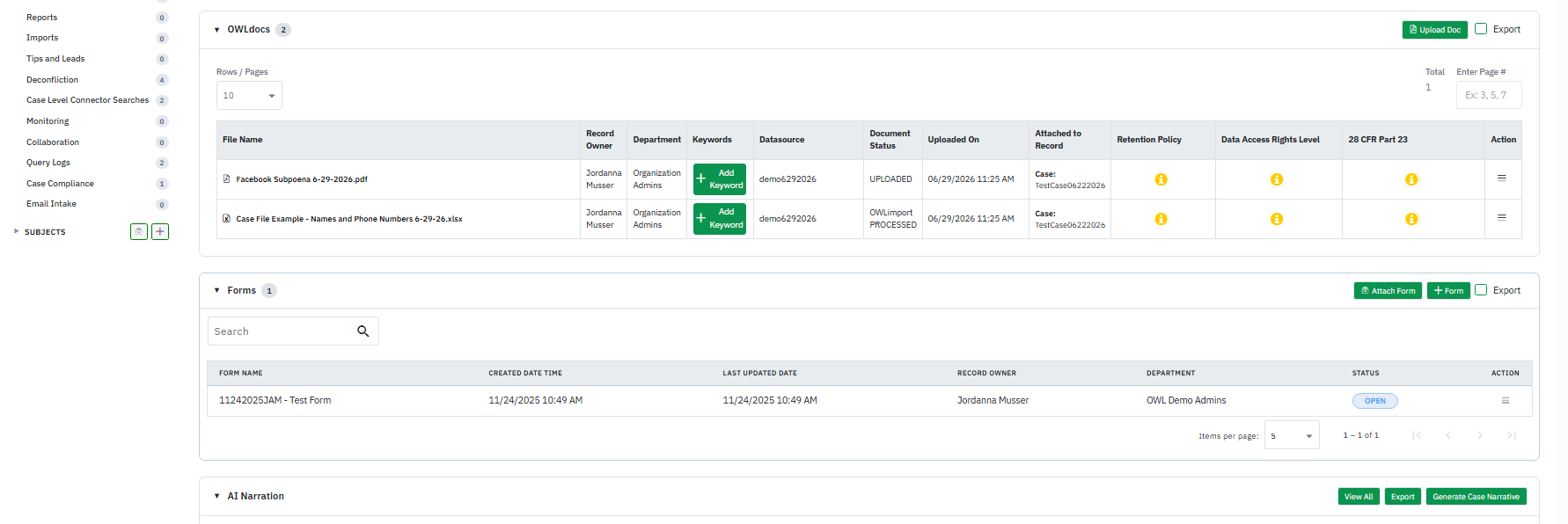
Additional documents can be uploaded throughout the investigation whenever new information becomes available or if supporting documentation was not included during case creation.
Examples include:
- Investigation reports
- Court orders
- Search warrants
- Forensic reports
- Financial records
- Witness statements
- Crime scene photographs
- CCTV footage
Investigators can also perform document intelligence operations from OWLDocs page such as:
- OWLidentify for image analysis
- OWLxtract for text extraction from documents
- Translation for multilingual evidence
Tips and Leads
Investigators can record and manage tips received from various sources.
Examples include:
- Confidential informants
- Public tips
- Partner agencies
- Internal intelligence
Anonymous sources
Reliable tips can be linked directly to the case and incorporated into the investigation.
Forms
Forms provide standardized templates for collecting investigative information.
Examples include:
- Witness Interview Forms
- Incident Reports
- Property Seizure Forms
- Crime Scene Documentation
- Intelligence Collection Forms
Standardized forms improve consistency and reporting accuracy.
Reports
Investigators can prepare reports to document investigative findings and recommendations.
Examples include:
- Investigation Progress Reports
- Intelligence Reports
- Field Investigation Reports
- Forensic Reports
- Investigation Summaries
Reports support supervisors and investigators throughout the investigation.
Deconfliction
Deconfliction automatically compares investigation records against existing organizational data to identify potential overlaps.
It compares:
- Cases
- Subjects
- Documents
- Forms
- Reports
- Searches
This helps prevent duplicate investigations and identifies related records.
Case-Level Connectors
Investigators can search integrated internal and external data sources directly from the case.
Searches may include:
- Suspect names
- Phone numbers
- Email addresses
- Vehicle registrations
- Addresses
- Social media identifiers
Search results can be used to enrich the investigation.
Monitoring
Monitoring allows investigators to schedule recurring searches.
The system automatically performs searches at configured intervals and alerts investigators whenever new information becomes available.
Collaboration
Investigators can collaborate with users, departments, or external agencies.
The Collaboration section displays:
- Shared users
- Departments
- External organizations
- Collaboration history
This enables secure information sharing while maintaining access controls.
Query Logs
Query Logs maintain a history of all searches performed within the case.
Each log includes:
- Search criteria
- Date and time
- User
- Connector
- Search results
Investigators can also create Monitoring jobs directly from Query Logs.
Case Compliance
Compliance settings allow investigators to manage regulatory requirements associated with the investigation.
Examples include:
- Classification
- Legal Hold
- Record Retention
- 28 CFR Part 23
- Access Permissions
These settings ensure investigations comply with organizational policies.
Imports
When structured data files (such as Excel spreadsheets or CSV files) are imported into OWLDocs using OWLimport and linked to the case, the imported datasets become available within the Imports section.
Investigators can review imported records without reopening the original files, making it easier to reference structured evidence throughout the investigation.
AI Narratives
AI Narratives automatically generate a concise summary of the investigation based on information currently associated with the case.
Narratives help investigators:
- Understand case progress quickly
- Review investigative activities
- Summarize evidence
- Save time preparing reports
Audit History
The Audit History provides a complete record of all actions performed on the case.
It records activities such as:
- Case creation
- Updates
- Status changes
- Evidence uploads
- Document modifications
- User access
- Collaboration activities
- Ownership transfers
This ensures transparency, accountability, and a complete audit trail throughout the investigation.
- Case Ownership Transfer
When necessary, ownership of a case can be transferred to another investigator.
Common reasons include:
- Investigator reassignment
- Department changes
- Workload balancing
- Extended leave
- Organizational restructuring
The complete investigation history remains preserved after the ownership transfer.
3. Case Status Progression
As the investigation progresses, the case status should be updated to reflect its current stage.
Typical statuses include:
| Status | Purpose |
| Open | Case has been created and is awaiting investigation. |
| Pending / On Hold | Investigation is temporarily paused while awaiting additional information, approvals, or external input. |
| Achieve | Record cannot be edited and is not available in the View - Edit lists. Filter must be used to find the record |
| Delete | Record is transferred to the Trash Bin and will be deleted as per the module policies. |
Organizations may configure additional statuses to align with their internal investigative workflows.
4. Investigation Completion
Before closing a case, investigators typically ensure that all required work has been completed.
This may include:
- Completing assigned tasks
- Reviewing evidence
- Finalizing reports
- Verifying linked records
- Confirming subject information
- Documenting investigative findings
- Performing final review
The case then becomes ready for closure.
5. Case Closure
Once the investigation is complete, the case status is changed to Closed.
A closed case generally indicates:
- Investigation completed
- Findings documented
- Required reports finalized
- Evidence preserved
- Audit history retained
- No further routine investigative activity expected
Although closed, authorized users may still view the case according to their permissions, while all historical activities remain available through the audit trail.
6. Archive and Retention
Closed cases may be archived according to the organization's retention policy.
Archived cases:
- Remain searchable
- Preserve all investigative records
- Retain complete audit history
- Support future review or legal requirements
Retention policies determine how long cases are preserved before final disposition.
7. Case Deletion
Where organizational policies and user permissions allow, cases may eventually be deleted after their retention period has expired.
Deletion is typically governed by:
- Organizational retention policies
- Administrative permissions
- Compliance requirements
- Legal hold restrictions
- Audit and governance controls
Cases under legal hold or active retention requirements cannot be removed until those restrictions are lifted.